Stripe Webhooks
PaymentsStripe sends webhook events for every payment lifecycle event — charges, payment intents, subscriptions, invoices, and disputes. Every event is signed with a HMAC-SHA256 signature in the Stripe-Signature header.
Webhook Events
8 event types
payment_intent.succeededA payment was successfully completed
payment_intent.payment_failedA payment attempt failed
customer.subscription.createdA new subscription was created
customer.subscription.deletedA subscription was cancelled
invoice.payment_succeededA recurring invoice was paid
invoice.payment_failedA recurring invoice payment failed
charge.dispute.createdA chargeback was opened
checkout.session.completedA checkout session was completed
Signature Verification
Stripe-SignatureHMAC-SHA256 via stripe.webhooks.constructEvent()
Sample Payload
payment_intent.succeeded
{
  "id": "evt_3QxKL2LkdIwHu7ix0M1234",
  "object": "event",
  "type": "payment_intent.succeeded",
  "created": 1712000000,
  "livemode": false,
  "data": {
    "object": {
      "id": "pi_3QxKL2LkdIwHu7ix0123456",
      "object": "payment_intent",
      "amount": 2000,
      "currency": "usd",
      "status": "succeeded",
      "customer": "cus_ABC123",
      "description": "Subscription payment",
      "receipt_email": "[email protected]",
      "metadata": {
        "order_id": "ord_987"
      }
    }
  }
}
Send a Sample Stripe Payload
Pick an event, enter your endpoint URL (or localhost), and fire a realistic Stripe payload with one click — no Stripe account needed.
Test Sender
Loading samples…
Capture & Inspect Stripe Webhooks Live
Get a free public HTTPS endpoint below, point Stripe at it, and watch events arrive in real time. Use the forwarding rule to relay them straight to your local server.
See it work in real time
Click below to get a live webhook URL instantly. Paste it anywhere — Stripe, GitHub, Postman — and watch events arrive right here.
Expires in 1 hour · No account needed
Forward Stripe webhooks to localhost
- Click Create live endpoint above to get a public HTTPS URL
- Paste the URL into Stripe's webhook settings
- In the Forwarding tab, add a rule: target =
http://localhost:3000/webhooks/stripe - Fire a test event from Stripe — it arrives in the inspector and hits your local handler simultaneously
Ready to test your Stripe webhook handler?
Free HTTPS endpoint with forwarding, retry, and event replay. No install, no CLI, no deploy.
Create Free AccountRelated Guides
Common Stripe Webhook Errors
HTTP 400 — Invalid signature
Cause: Your webhook secret is wrong, or you're reading the body as a parsed object instead of the raw string.
Fix: Pass the raw request body buffer to stripe.webhooks.constructEvent(), not JSON.parse(). In Express, use express.raw({ type: 'application/json' }) before your route.
HTTP 400 — Timestamp too old
Cause: Stripe rejects events where the timestamp in Stripe-Signature is more than 5 minutes old to prevent replay attacks.
Fix: Ensure your server clock is synced (NTP). In testing, you can disable tolerance with { tolerance: 0 } — never do this in production.
Events received out of order
Cause: Stripe does not guarantee event ordering. invoice.payment_succeeded may arrive before invoice.created.
Fix: Design your handler to be idempotent. Always fetch the current state from the Stripe API instead of relying solely on the event payload.
Duplicate events
Cause: Stripe retries events if your endpoint returns a non-2xx status or times out.
Fix: Store the event ID and check for duplicates before processing. Return 200 immediately, then process asynchronously.
Signature Verification Code
const stripe = require('stripe')(process.env.STRIPE_SECRET_KEY);

app.post('/webhooks/stripe', express.raw({ type: 'application/json' }), (req, res) => {
  const sig = req.headers['stripe-signature'];
  let event;
  try {
    event = stripe.webhooks.constructEvent(req.body, sig, process.env.STRIPE_WEBHOOK_SECRET);
  } catch (err) {
    return res.status(400).send(`Webhook Error: ${err.message}`);
  }
  // Handle event.type here
  res.json({ received: true });
});import stripe
from flask import Flask, request
app = Flask(__name__)
@app.route('/webhooks/stripe', methods=['POST'])
def stripe_webhook():
payload = request.get_data()
sig_header = request.headers.get('Stripe-Signature')
try:
event = stripe.Webhook.construct_event(
payload, sig_header, os.environ['STRIPE_WEBHOOK_SECRET']
)
except stripe.error.SignatureVerificationError:
return 'Invalid signature', 400
# Handle event['type'] here
return '', 200require 'stripe'
post '/webhooks/stripe' do
payload = request.body.read
sig_header = request.env['HTTP_STRIPE_SIGNATURE']
begin
event = Stripe::Webhook.construct_event(
payload, sig_header, ENV['STRIPE_WEBHOOK_SECRET']
)
rescue Stripe::SignatureVerificationError => e
halt 400, "Invalid signature"
end
# Handle event.type here
status 200
endimport (
"github.com/stripe/stripe-go/v76/webhook"
)
func handleWebhook(w http.ResponseWriter, r *http.Request) {
body, _ := io.ReadAll(r.Body)
event, err := webhook.ConstructEvent(body,
r.Header.Get("Stripe-Signature"),
os.Getenv("STRIPE_WEBHOOK_SECRET"))
if err != nil {
w.WriteHeader(http.StatusBadRequest)
return
}
// Handle event.Type here
w.WriteHeader(http.StatusOK)
}How to Test Stripe Webhooks with WebhookWhisper
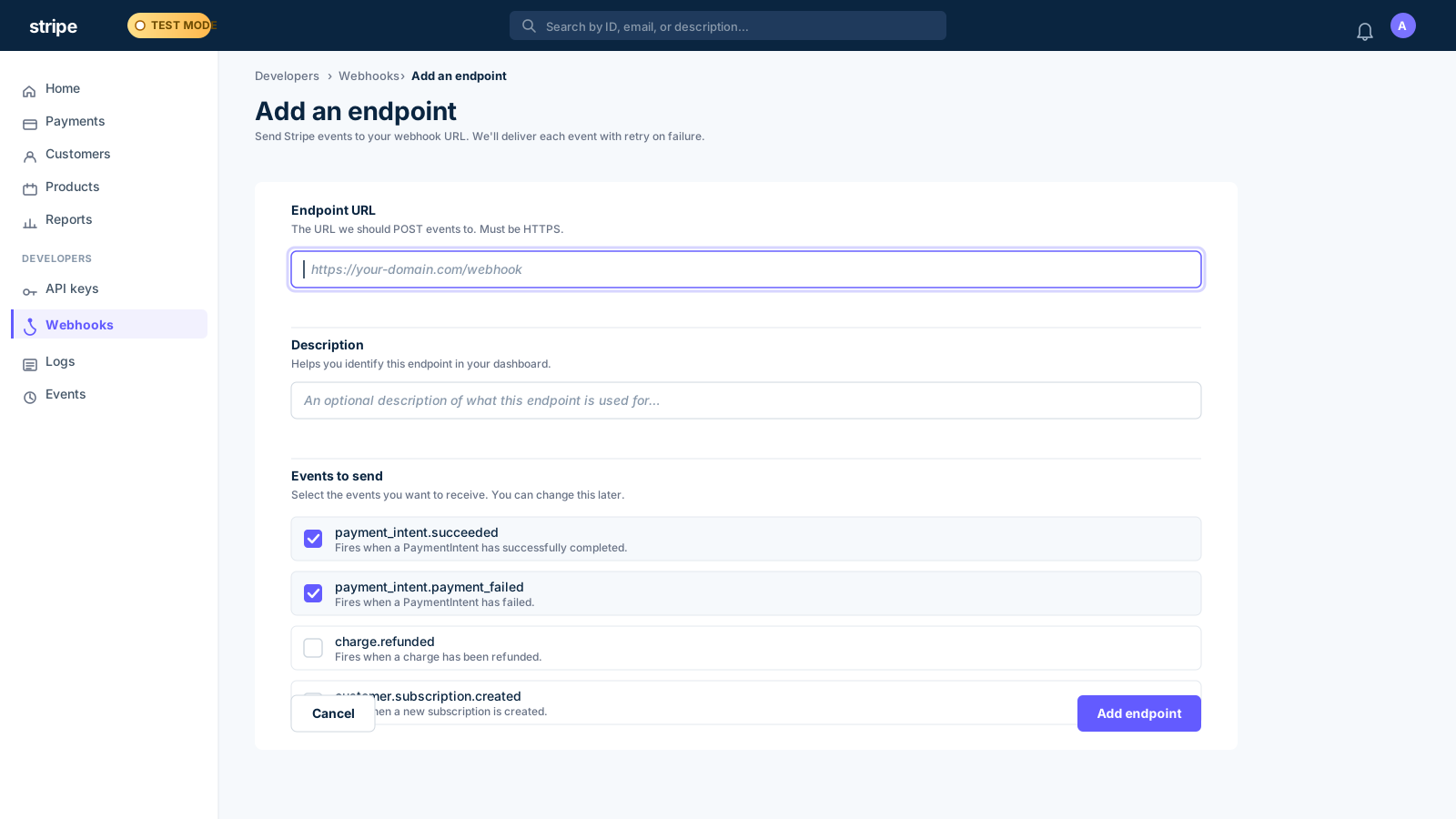
- 1
Create a free WebhookWhisper endpoint
Click "Create live endpoint" on this page. Copy the HTTPS URL — this is your temporary webhook receiver.
- 2
Open Stripe Dashboard → Webhooks
Go to Developers → Webhooks in your Stripe Dashboard. Click "Add endpoint".
- 3
Paste your WebhookWhisper URL
Enter your WebhookWhisper URL as the endpoint URL. Select the events you want to listen to (e.g. payment_intent.succeeded).
- 4
Trigger a test event
Click "Send test webhook" in the Stripe Dashboard. Watch the event arrive in WebhookWhisper's inspector in real time.
- 5
Set up forwarding to localhost
In WebhookWhisper, add a forwarding rule pointing to http://localhost:3000/webhooks/stripe. Now every Stripe event hits both the inspector and your local handler.
Stripe Webhook FAQ
Why is my Stripe webhook returning a 400 error?
The most common cause is passing a parsed JSON body to stripe.webhooks.constructEvent() instead of the raw buffer. Use express.raw() middleware in Express, or read the raw bytes before any JSON parsing.
How do I get my Stripe webhook signing secret?
In Stripe Dashboard → Developers → Webhooks, click your endpoint and find "Signing secret". For local testing with the Stripe CLI, run `stripe listen` and it will display a temporary secret.
Does Stripe guarantee event delivery?
Stripe retries failed deliveries for up to 3 days with exponential backoff. Your endpoint must return a 2xx status within 30 seconds or Stripe will retry.
How do I test Stripe webhooks locally without deploying?
Use WebhookWhisper: get a free public URL, point Stripe at it, then forward events to your localhost. No CLI install or tunnel needed.
Can I receive Stripe webhooks in test mode and live mode?
Yes — but you need separate webhook endpoints for each. Your test mode endpoint only receives events from test mode activity, and vice versa.