Slack Webhooks
ProductivitySlack sends webhook payloads for the Events API (message events, channel changes), slash commands, and interactive components (buttons, modals). Used to build Slack bots and workflow automations.
Webhook Events
5 event types
messageMessage posted in a channel or DM
app_mentionApp was mentioned with @app_name
reaction_addedReaction added to a message
slash_commandUser invoked a slash command
block_actionsUser interacted with a button or menu
Signature Verification
X-Slack-SignatureHMAC-SHA256 of v0:timestamp:body using signing secret
Sample Payload
message
{
  "token": "XXYYZZ",
  "team_id": "TXXXXXXXX",
  "api_app_id": "AXXXXXXXXX",
  "event": {
    "type": "message",
    "channel": "C2147483705",
    "user": "U2147483697",
    "text": "Hello world!",
    "ts": "1712000000.000100"
  },
  "type": "event_callback",
  "event_id": "Ev09TQ51A0",
  "event_time": 1712000000
}
Send a Sample Slack Payload
Pick an event, enter your endpoint URL (or localhost), and fire a realistic Slack payload with one click — no Slack account needed.
Test Sender
Loading samples…
Capture & Inspect Slack Webhooks Live
Get a free public HTTPS endpoint below, point Slack at it, and watch events arrive in real time. Use the forwarding rule to relay them straight to your local server.
See it work in real time
Click below to get a live webhook URL instantly. Paste it anywhere — Stripe, GitHub, Postman — and watch events arrive right here.
Expires in 1 hour · No account needed
Forward Slack webhooks to localhost
- Click Create live endpoint above to get a public HTTPS URL
- Paste the URL into Slack's webhook settings
- In the Forwarding tab, add a rule: target =
http://localhost:3000/webhooks/slack - Fire a test event from Slack — it arrives in the inspector and hits your local handler simultaneously
Ready to test your Slack webhook handler?
Free HTTPS endpoint with forwarding, retry, and event replay. No install, no CLI, no deploy.
Create Free AccountRelated Guides
Common Slack Webhook Errors
URL verification challenge fails
Cause: When you first register a Slack Events API URL, Slack sends a challenge request expecting the challenge value echoed back as JSON within 3 seconds.
Fix: Handle the url_verification event type: respond with { "challenge": req.body.challenge }. This must happen before any other processing.
Invalid signing secret error
Cause: Using the OAuth token instead of the Signing Secret, or computing HMAC on a parsed body instead of raw bytes.
Fix: Find your Signing Secret in your Slack App settings → Basic Information. Compute HMAC-SHA256 of v0:{timestamp}:{raw_body} and compare with the v0= prefix stripped from X-Slack-Signature.
Receiving duplicate events
Cause: Slack retries events if your endpoint doesn't respond with 200 within 3 seconds.
Fix: Respond 200 immediately, then process asynchronously. Deduplicate using the event_id field in the payload.
Signature Verification Code
const crypto = require('crypto');

app.post('/webhooks/slack', express.raw({ type: 'application/json' }), (req, res) => {
  const timestamp = req.headers['x-slack-request-timestamp'];
  const slackSig = req.headers['x-slack-signature'];
  // Prevent replay attacks
  if (Math.abs(Date.now() / 1000 - timestamp) > 300) {
    return res.status(400).send('Request too old');
  }
  const sigBase = `v0:${timestamp}:${req.body}`;
  const hmac = crypto.createHmac('sha256', process.env.SLACK_SIGNING_SECRET);
  const digest = 'v0=' + hmac.update(sigBase).digest('hex');
  if (!crypto.timingSafeEqual(Buffer.from(digest), Buffer.from(slackSig))) {
    return res.status(403).send('Invalid signature');
  }
  const body = JSON.parse(req.body);
  if (body.type === 'url_verification') return res.json({ challenge: body.challenge });
  // Handle body.event here
  res.sendStatus(200);
});import hmac, hashlib, time, os
from flask import Flask, request
app = Flask(__name__)
@app.route('/webhooks/slack', methods=['POST'])
def slack_webhook():
timestamp = request.headers.get('X-Slack-Request-Timestamp', '')
if abs(time.time() - int(timestamp)) > 300:
return 'Request too old', 400
sig_base = f"v0:{timestamp}:{request.get_data().decode()}"
digest = 'v0=' + hmac.new(
os.environ['SLACK_SIGNING_SECRET'].encode(),
sig_base.encode(), hashlib.sha256
).hexdigest()
if not hmac.compare_digest(digest, request.headers.get('X-Slack-Signature', '')):
return 'Invalid signature', 403
body = request.get_json()
if body.get('type') == 'url_verification':
return {'challenge': body['challenge']}
# Handle body['event'] here
return '', 200How to Test Slack Webhooks with WebhookWhisper
- 1
Create a Slack app at api.slack.com
Go to api.slack.com/apps → Create New App → From scratch. Choose your workspace.
- 2
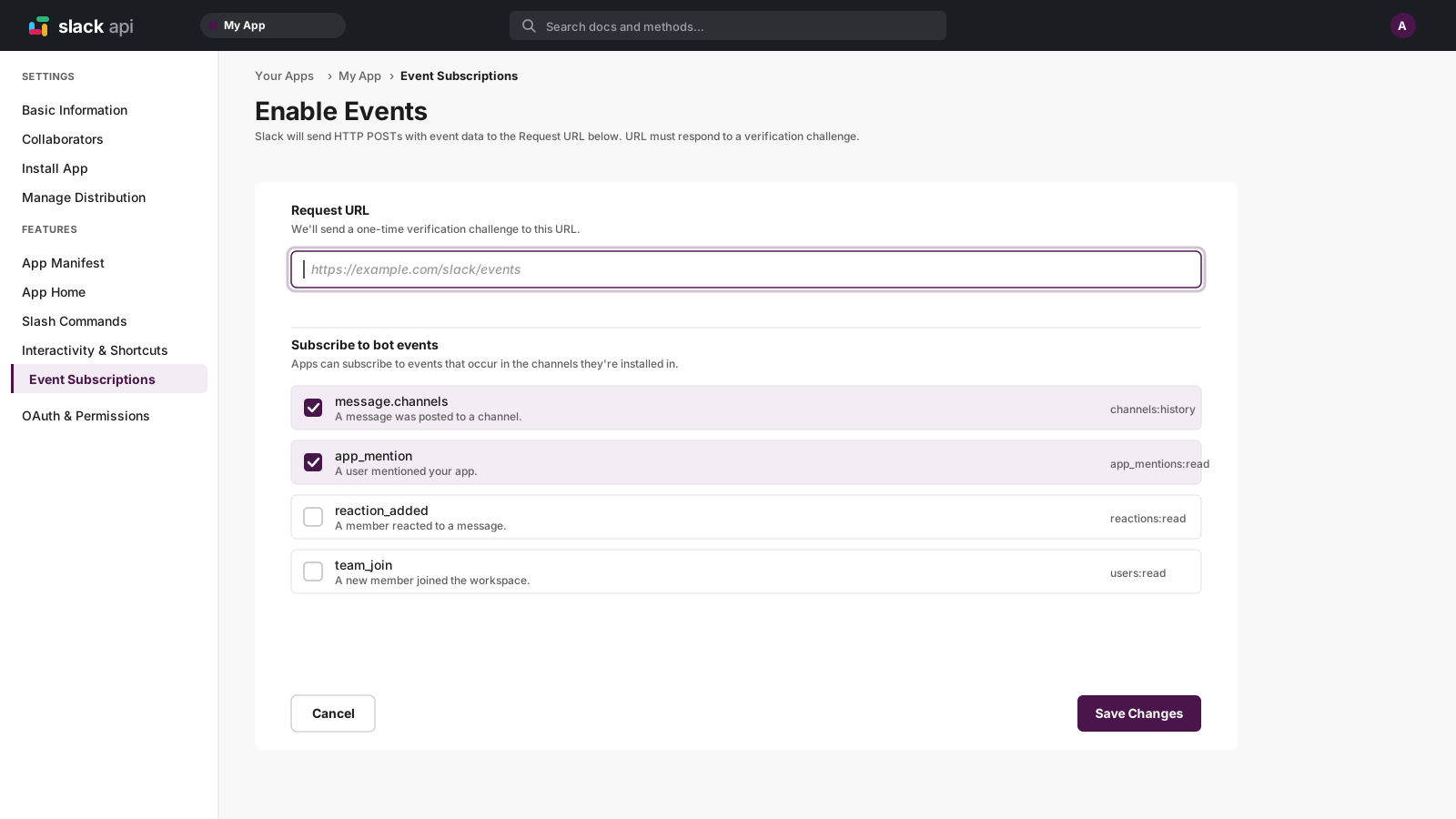
Enable Event Subscriptions
Under "Event Subscriptions", toggle it on. Create a free WebhookWhisper endpoint and paste it as the Request URL. Slack will send a challenge — WebhookWhisper captures it so you can inspect it.
- 3
Subscribe to bot events
Under "Subscribe to bot events", add events like message.channels or app_mention.
- 4
Install the app to your workspace
Go to "Install App" and authorize it. The app is now listening for events.
- 5
Forward to localhost
Add a forwarding rule in WebhookWhisper to relay Slack events to http://localhost:3000/webhooks/slack.
Slack Webhook FAQ
What is the Slack url_verification challenge?
When you first set your Events API URL, Slack sends a POST with type: url_verification and a challenge string. Your endpoint must respond with that challenge value within 3 seconds.
How is Slack's signing secret different from other providers?
Slack signs requests with v0:{timestamp}:{body} — you must include the v0: prefix and timestamp in the HMAC base string. This also doubles as replay attack prevention.
Can I use Slack incoming webhooks instead of Events API?
Incoming webhooks are for sending messages to Slack (outgoing). The Events API is for receiving events from Slack (incoming). They're separate mechanisms.
How do I handle Slack's 3-second timeout?
Acknowledge with 200 immediately, then process the event asynchronously in a background job or queue. Never do heavy work synchronously in your Slack webhook handler.