GitHub Webhooks
Developer ToolsGitHub sends webhook events for repository activity: pushes, pull requests, issues, Actions workflow runs, releases, and more. Used for CI/CD triggers, PR bots, and deploy automations.
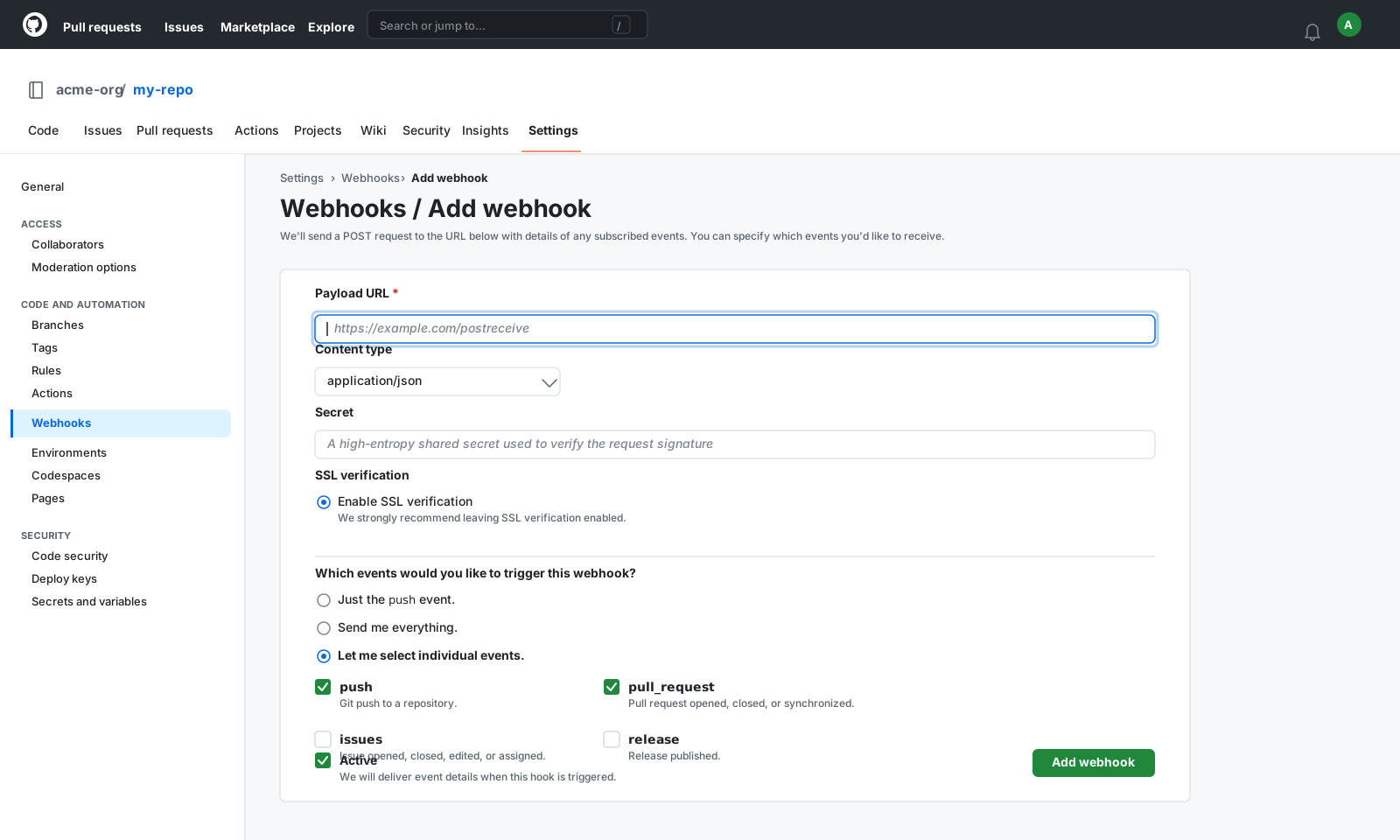
Webhook Events
8 event types
pushCommits pushed to a branch
pull_requestPR opened, closed, merged, or reviewed
workflow_runGitHub Actions workflow completed
issuesIssue opened, closed, or labelled
releaseRelease published or created
issue_commentComment posted on an issue or PR
createBranch or tag created
starRepository starred or unstarred
Signature Verification
X-Hub-Signature-256HMAC-SHA256 of raw body; compare sha256=<hex> to header
Sample Payload
push
{
  "ref": "refs/heads/main",
  "before": "abc1234567890abc",
  "after": "def1234567890def",
  "repository": {
    "id": 123456,
    "name": "my-repo",
    "full_name": "acme/my-repo",
    "private": false
  },
  "pusher": {
    "name": "octocat",
    "email": "[email protected]"
  },
  "commits": [
    {
      "id": "def1234567890def",
      "message": "Fix: webhook signature verification",
      "author": {
        "name": "octocat"
      }
    }
  ]
}
Send a Sample GitHub Payload
Pick an event, enter your endpoint URL (or localhost), and fire a realistic GitHub payload with one click — no GitHub account needed.
Test Sender
Loading samples…
Capture & Inspect GitHub Webhooks Live
Get a free public HTTPS endpoint below, point GitHub at it, and watch events arrive in real time. Use the forwarding rule to relay them straight to your local server.
See it work in real time
Click below to get a live webhook URL instantly. Paste it anywhere — Stripe, GitHub, Postman — and watch events arrive right here.
Expires in 1 hour · No account needed
Forward GitHub webhooks to localhost
- Click Create live endpoint above to get a public HTTPS URL
- Paste the URL into GitHub's webhook settings
- In the Forwarding tab, add a rule: target =
http://localhost:3000/webhooks/github - Fire a test event from GitHub — it arrives in the inspector and hits your local handler simultaneously
Ready to test your GitHub webhook handler?
Free HTTPS endpoint with forwarding, retry, and event replay. No install, no CLI, no deploy.
Create Free AccountRelated Guides
Common GitHub Webhook Errors
HTTP 400 — Invalid X-Hub-Signature-256
Cause: The HMAC digest doesn't match. Usually caused by reading a parsed body instead of the raw buffer, or using the wrong secret.
Fix: Use the raw request body bytes for HMAC computation. In Express, apply express.raw() before your route. Double-check the secret matches exactly what's set in GitHub.
Delivery shows "failed" in GitHub UI
Cause: Your endpoint returned a non-2xx status or timed out (GitHub's timeout is 10 seconds).
Fix: Return 200 immediately and process the event asynchronously. Use a queue (e.g. BullMQ, SQS) for heavy processing.
Receiving unexpected event types
Cause: You selected "Send me everything" when creating the webhook.
Fix: Edit the webhook in GitHub → Settings → Webhooks and select only the specific events you need.
Signature Verification Code
const crypto = require('crypto');

app.post('/webhooks/github', express.raw({ type: 'application/json' }), (req, res) => {
  const sig = req.headers['x-hub-signature-256'];
  const hmac = crypto.createHmac('sha256', process.env.GITHUB_WEBHOOK_SECRET);
  const digest = 'sha256=' + hmac.update(req.body).digest('hex');
  if (!crypto.timingSafeEqual(Buffer.from(sig), Buffer.from(digest))) {
    return res.status(400).send('Invalid signature');
  }
  const event = req.headers['x-github-event'];
  const payload = JSON.parse(req.body);
  // Handle event here
  res.json({ received: true });
});import hmac, hashlib, os
from flask import Flask, request
app = Flask(__name__)
@app.route('/webhooks/github', methods=['POST'])
def github_webhook():
sig = request.headers.get('X-Hub-Signature-256', '')
digest = 'sha256=' + hmac.new(
os.environ['GITHUB_WEBHOOK_SECRET'].encode(),
request.get_data(), hashlib.sha256
).hexdigest()
if not hmac.compare_digest(sig, digest):
return 'Invalid signature', 400
event = request.headers.get('X-GitHub-Event')
# Handle event here
return '', 200import "crypto/hmac"
import "crypto/sha256"
func verifyGitHub(body []byte, signature, secret string) bool {
mac := hmac.New(sha256.New, []byte(secret))
mac.Write(body)
expected := "sha256=" + hex.EncodeToString(mac.Sum(nil))
return hmac.Equal([]byte(signature), []byte(expected))
}How to Test GitHub Webhooks with WebhookWhisper
- 1
Create a free WebhookWhisper endpoint
Click "Create live endpoint" on this page and copy your HTTPS URL.
- 2
Go to your GitHub repo → Settings → Webhooks
Click "Add webhook". Paste your WebhookWhisper URL into the Payload URL field.
- 3
Set content type to application/json
Change Content type to "application/json". Add a secret — copy it, you'll need it for signature verification.
- 4
Choose events to receive
Select individual events (push, pull_request, issues) or "Send me everything" for testing.
- 5
Trigger and inspect
GitHub sends a ping event immediately. Watch it appear in WebhookWhisper, then forward to your local handler.
GitHub Webhook FAQ
What is X-Hub-Signature-256?
It's the HMAC-SHA256 signature GitHub attaches to every webhook request. Compute the same HMAC on your side using the raw body and your secret, and compare with timing-safe equality.
How do I test GitHub webhooks locally?
Use WebhookWhisper: get a public HTTPS URL, paste it into GitHub's webhook settings, then add a forwarding rule to http://localhost:3000. No ngrok needed.
Can GitHub webhooks send to localhost?
No — GitHub requires a publicly accessible HTTPS URL. Use WebhookWhisper as a relay: it receives the event and forwards it to your local server.
How long does GitHub retry failed webhooks?
GitHub retries for up to 3 days. You can also redeliver any event manually from the webhook's Recent Deliveries tab.